How to use queries in Logseq
26 January 2023 · 2 min read
- How-to guides

What are queries?
A query is a way to ask your database questions. You can use queries to search for backlinks (and tags - these are interchangeable in Logseq), blocks with user-defined properties, text snippets, date-based information and different management task statuses and priorities. Queries are particularly useful when looking for a combination of information, as you can use Boolean operators to refine your results. They can be thought of as saved searches. The "questions" remain as a block in your database, which means you can return to the query when you need to ask the same questions.
Why use queries at all?
Queries are useful for building dashboards for your most repeatable workflows, for example, project and task management dashboards. They also create accessible searches when you require ease of reference in a particular location in your database. Queries are the easiest way to find text quickly in your database, rather than using 'Unlinked references'. Finally, they are a great tool for building indexes of information, particularly when you have used properties consistently in your database.
What is returned by a query?
Queries return a subset of blocks that match your input criteria. Looking at the simplest example of a [[backlink]], a query will return the following:
-
All blocks linked to [[backlink]] (i.e. [[backlink]] appears in the block)
-
All blocks indented below a block linked to [[backlink]]
-
All blocks on the [[backlink]] page
How to use queries in Logseq
The standard way of bringing up a query is using the / command to bring up the context menu. Then type query. It will automatically input the standard query format {{query }}
User-defined properties:{{query (property property_name property_value) }}
-
property_name is the property that you have defined. My typical examples are type::, producer::, etc.
-
property_value is optional. You can use normal text or [[backlinks]]
Text snippets:{{query "search text in quotation marks"}}
Date-based information: {{query (between start end)}}
- start and end can be either dates from the journal, e.g. [[Jan 1st, 2023]], natural language, e.g. yesterday or the built-in operators + and - with time frames min for minutes, h for hours, d for days, w for weeks, m for months and y for years
Task statuses:{{query (task task_status)}}
- task_status can be later, todo, now, doing, waiting, cancelled or done.
Priorities: {{query (priority priority_level)}}
- priority_level can be either A, B, or C.
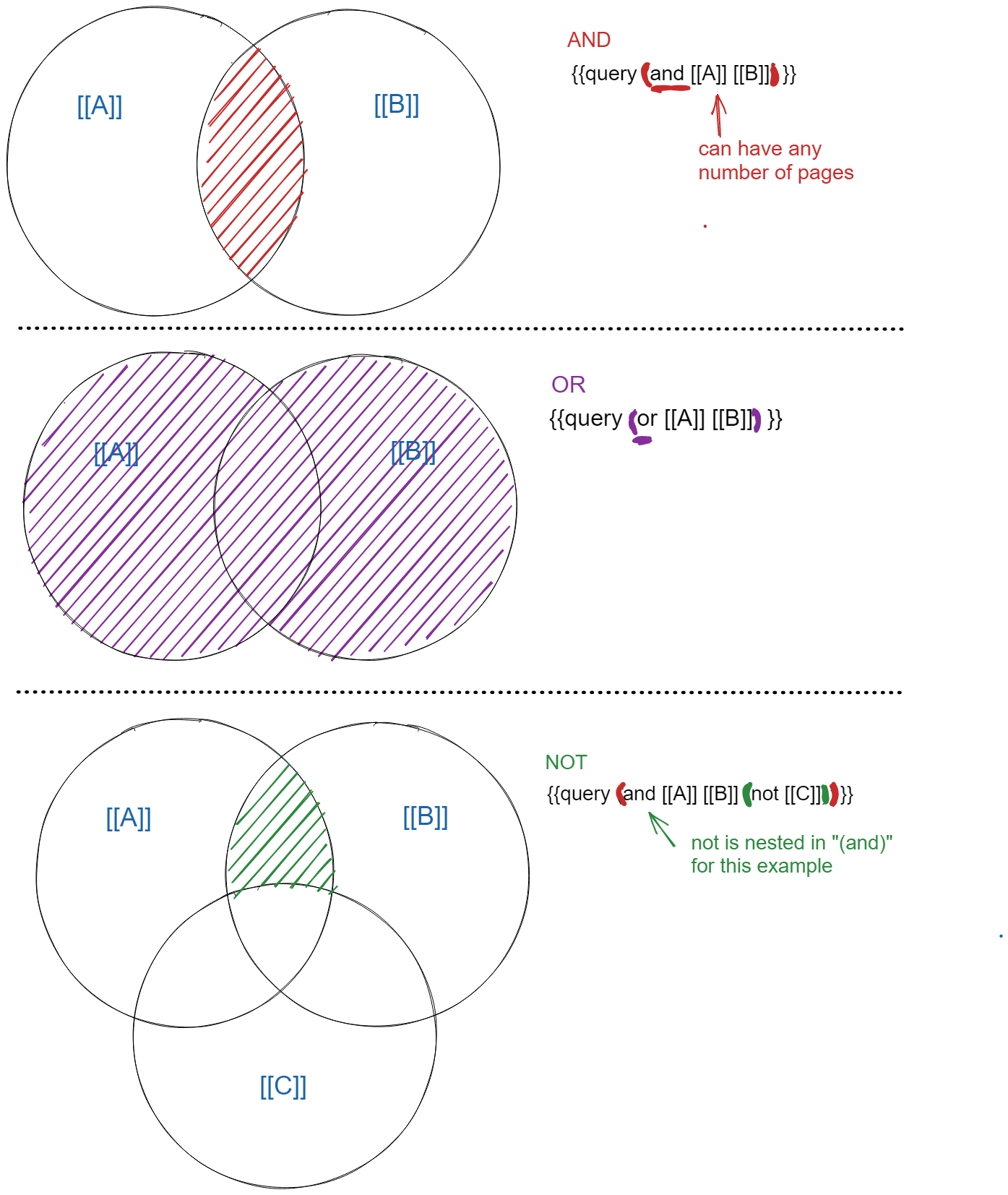
How does Boolean logic work?
The image below is taken from Logseq Mastery where there is a full video dedicated to this topic. However, the second video linked below also explains this diagram in detail.
Helpful tips when working with queries
This post is a compendium to my videos on YouTube.
The following videos all look at how to use queries in Logseq.